Skip to content

G DATA bets for safety devices for Android at MWC

MWC 2015. G DATA, the German company specializing in security solutions, was present at the Mobile World Congress 2015 held in Barcelona with a clear message directed to an interconnected world in which mobile devices and its applications invade everything.

In this sense, though they had announced that it would be one of its “highlights” during MWC 2015, they made official that their new app that encrypts SMS messages between devices on Android phones will be available in Google Play on April.

Microsoft publishes Mac’s Office 2016 Trial

Microsoft has published a trial version of Office 2016 for Mac. A version that can be downloaded for free and that will get updates until the final release, expected to come out on the second semester of 2015 according to Microsoft’s announcement. Office16’s trial for Mac is the “classic” version of the office suite, locally installable and intended for computers with keyboard and mouse.

It is specially designed for computers running OS X Operative System,optimized for high resolution Retina displays and highly connected to cloud storage services, such as Enterprise OneDrive and SharePoint.

How to correctly apply thermal paste

Thermal paste (also called thermal silicone or thermal putty) is a substance that improves the conduction of heat between the surfaces of two or more objects that may be irregular or not be in direct contact. Thermal paste is used to join (paste, in a way) the processor with the base of the heat sink, improving the passage of heat from the processor to the heat sink to dissipate the heat generated by the CPU. Application of thermal paste isn’t at all difficult, but we have to be careful; if we use too much, we might achieve the opposite of the desired effect and end up raising the CPU’s temperature. So be patient and be careful.

Definitions

Before beginning, let’s clarify a few terms to ensure that we apply the thermal paste in a determined manner.

  • IHS: Integrated heat spreader. A small metallic sheet that covers the processor, this mainly protects the
  • DIE: The most internal part of a processor. Basically, it’s the processor in and of itself where you’ll find all the cores, memory, cache, etc.
  • PCB: The base plate of any component. For example, the base plate that holds all the components of the graphics card. May be green, blue, black, and so on.

What is thermal paste, really? And why is it necessary?

The IHS of current processors isn’t 100% smooth and without malformations, and neither is the base of heat sinks; thus, if the IHS and the base of the heat sink aren’t in complete contact, heat can’t get to the heat sink and the temperature of the processor will increase. For this reason we need thermal paste, which better units the processor and the base of the heat sink, getting around any malformations or irregularities that either may have.

ASRock has its LGA 1151 motherboard compatible with Intel Skylake processors

In spite of the delay the launching of Intel Skylake processors has suffered, it looks like ASRock is preparing its machinery to receive the sixth generation of Intel processors with open arms. At the Embedded World 2015, the company has shown a motherboard for industrial applications that has caught the attention for including the new LGA 1151 socket.

This socket is prepared to support the new Skylake processors manufactured at 14 nanometers that will come to replace the current Haswell and Broadwell (if the desktop version isn’t finally cancelled).

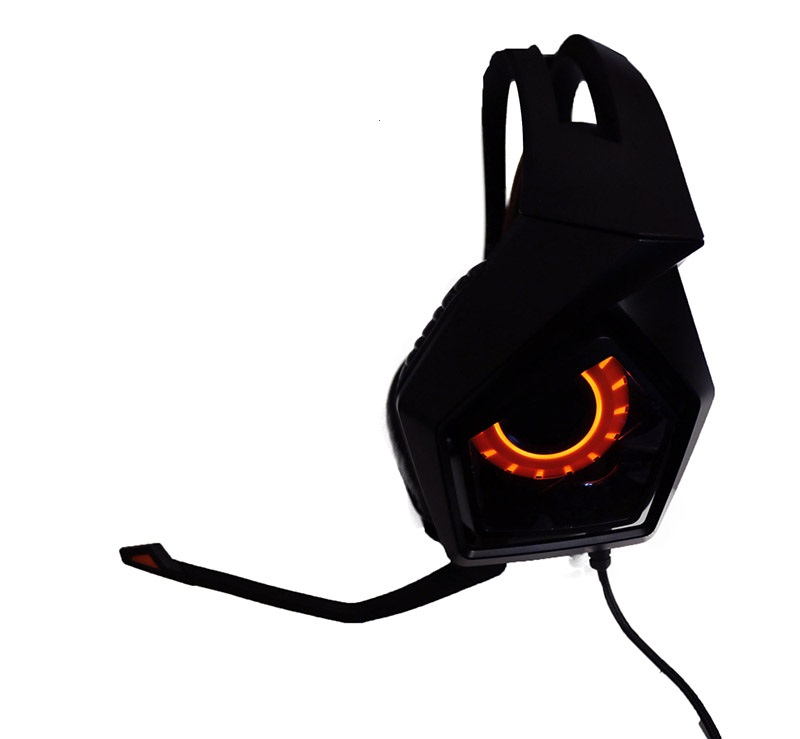
ASUS Strix 7.1 surround gaming headset Review

  • by

After a remarkable series of Strix graphics, Asus is betting once more for this series with such a unique and aggressive aesthetics, in this case with a pair of 7.1 gaming headphones that comes to compete with alternatives such as the Razer Tiamat.

It is a kit that includes external DSP with an integrated noise cancelling microphone, headphones with real 7.1 microgo sound, and a whole lot of other functions in order to improve the surrounding sensation and amplify some frequencies, for example, to highlight the footsteps in shooting games. A really ambitious bet that we will now see how it behaves.

ASUS Strix 7.1

New information about AMD’s Zen CPUs

  • by

New information coming from, in theory, an official route sheet from AMD has allowed us to see new details on AMD’s new Zen CPUs, a much waited generation that could be the revulsive that Sunnyvale’s giant needs.

Don’t get me wrong, the red giant offers an excellent price-performance ratio within its processors, but has been left far behind Intel in terms of monofilament performance and efficiency.

Lenovo explains how to uninstall SuperFish

  • by

Lenovo is reacting quickly in the case of Superfish. A couple hours ago, the CTO, Peter Hortensius, recognized the problem and explained that they are already working on an automated tool that will allow any user to uninstall this adware from their computer in just a few minutes and without any technical knowledge. They have also published a complete list of computers that used to come with it from series from September to December 2014.

  • G Series: G410, G510, G710, G40-70, G50-70, G40-30, G50-30, G40-45, G50-45
  • U Series: U330P, U430P, U330Touch, U430Touch, U530Touch
  • Y Series: Y430P, Y40-70, Y50-70
  • Z Series: Z40-75, Z50-75, Z40-70, Z50-70
  • S Series: S310, S410, S40-70, S415, S415Touch, S20-30, S20-30Touch
  • Flex Series: Flex2 14D, Flex2 15D, Flex2 14, Flex2 15, Flex2 14(BTM), Flex2 15(BTM), Flex 10
  • MIIX Series: MIIX2-8, MIIX2-10, MIIX2-11
  • YOGA Series: YOGA2Pro-13, YOGA2-13, YOGA2-11BTM, YOGA2-11HSW
  • E Series: E10-30

To uninstall SuperFish manually from your computer you just have to follow these steps: